If you run one or two vacation rentals, or up to five, Google Vacation Rentals is a free way to show them to travelers searching on Google. Guides online disagree on the basics: what it costs, who it is for, how long it takes and where guests actually book.
This guide answers those questions from Google's own pages, each linked under Sources: what Google Vacation Rentals is, what it costs, where guests book, how to get picked up, and what keeps a listing showing once it is.
Key Takeaways
- Google Vacation Rentals shows rentals in Google Search, Maps and Google Travel, and its free booking links send guests to book on your own website.
- Google charges no fees for those referrals or bookings. Your costs are the software that connects you, and card processing if you take cards.
- For property managers with fewer than 500 properties, Google strongly recommends connecting through an approved connectivity partner. Futurestay is one of Google's vacation rentals partners.
- Only entire homes can appear.
- On Futurestay, your properties start getting picked up about 7 to 21 days after you switch it on. Google doesn't give an exact date.
- What keeps a listing showing: at least 8 photos, complete details, and a booking page whose total price matches Google's, with every mandatory fee included.
- Skip the Google Business Profile and do-it-yourself rental schema. Neither is the way in for a rental home.
The Short Answer
Google Vacation Rentals is a free way to show your rental in Google Search, Maps and Google Travel, with guests booking on your own website. You connect through software on Google's list of vacation rentals partners, such as Futurestay, and switch it on. Your properties then start getting picked up, usually in about 7 to 21 days; Google doesn't give an exact date.
What Is Google Vacation Rentals?
Google Vacation Rentals is how Google shows vacation rentals in its search results. In Google's words, listings "appear alongside organic search results on Google", and travelers find them "by browsing relevant keywords in Google Search, exploring destinations in Google Maps, or filtering for vacation rentals in Google Travel's dedicated lodging search" [1]. Listings show details such as "approximate location, rates, availability, and booking link redirects", and travelers can filter by price, property type, occupancy, amenities and guest rating [1].
It is not a booking site. It works like a metasearch engine: Google shows the rental and links to where it can be booked. Google's 2019 announcement put it plainly: "All property information and bookings are provided and done by the travel partner" [2]. Google also shows vacation rentals together with hotels in what it calls unified lodging [3].
Is It the Same as a Google Business Profile or Hotel Center?
No. To qualify for a Google Business Profile, "a business must make in-person contact with customers during its stated hours", and Google's rules list "Rental or for-sale properties such as vacation homes" as ineligible. "Sales or leasing offices, however, are eligible for verification" [4]. So a staffed rental office may qualify, but the rental home itself doesn't.
Hotel Center is an account for companies that work with Google directly, such as its software partners. Google's own vacation rental markup instructions, for example, are "intended for sites that have already connected with a Google Technical Account Manager and have access to the Hotel Center" [5]. As a Futurestay host, you switch Google Vacation Rentals on in your Futurestay dashboard instead, and Futurestay builds and maintains the feed Google needs.
Where Do Guests Book?
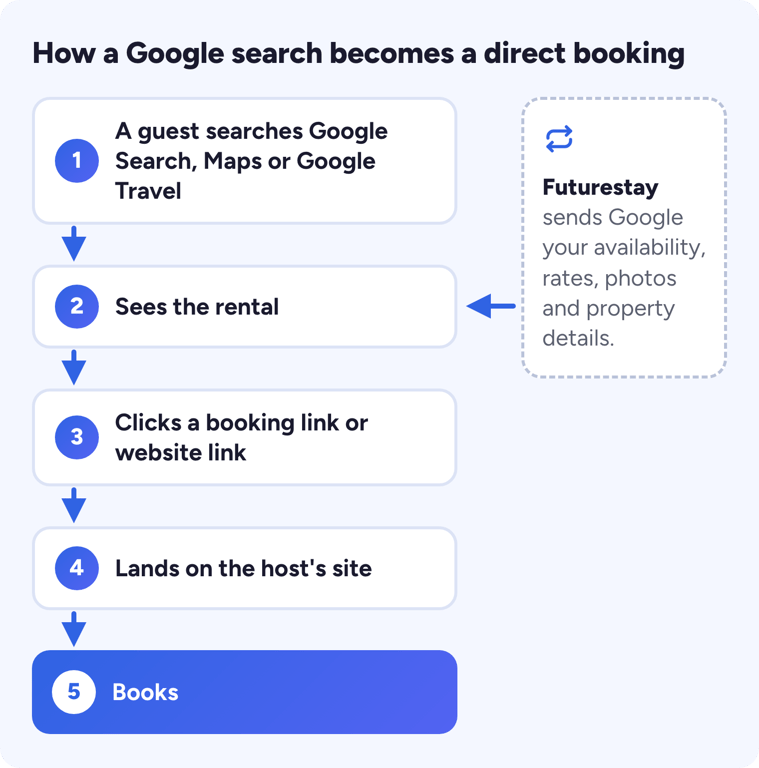
On your own website. Google sends guests to the partner that supplied the listing, and the partner handles the booking [2]. On Futurestay, that is your own direct booking site: when a guest clicks through from Google, they land on your site and book with you.
Google uses two kinds of link [6]:
- Booking links appear when Google has a price for the guest's dates. Google passes those dates to your site "so that the landing page matches what the user requested" [6].
- Website links go straight to the property's page on your site, with or without a price [6].
If more than one partner sends Google a link for the same property, Google says it "makes a best-effort determination of which link directs the user to the property manager or supplier site and presents that link to the user" [6].
Is Google Vacation Rentals Free?
Google's side is free. Google says there are "no fees for Google-generated referrals or bookings" [1], and that becoming a partner is free, "with no advertising spend required" [7]. What you pay for is everything around it:
| What | Who charges |
|---|---|
| Showing on Google, referrals and bookings | Nobody. Google charges no fees [1] |
| The software that connects you to Google | Your software provider. On Futurestay, a subscription with no commission |
| Card payments | Your card processor, such as Stripe |
| A booking made on another booking site that works with Google | That booking site, at its usual fees |
Google Vacation Rentals is included on both Futurestay plans; see pricing for the current plans.
Can You Pay for Ads on Google Vacation Rentals?
Google's paid option, Travel Feeds in Search Ads, can "feature hotels, activities, vacation rentals, and booking links with your Search ads" [8]. It becomes available "After your Hotel Center account is activated, and if you are eligible", by linking a Google Ads account to a Hotel Center feed [9], so it is aimed at companies with their own Hotel Center account. The free listings are ranked by usefulness [3].
You can still run ordinary Google Search ads that send people to your own site [10]. Start with the free channels and test ads small.
Who Can Be on Google Vacation Rentals?
The home. Google's rules for the property itself are simple. It "must provide a furnished space that's private to the guest who's renting it", and it "must also accept short-term, overnight reservations and be managed and cleaned in-between stays" [11]. It also has to be the whole place: "We only support full properties" [12]. Futurestay is built for the same thing: whole homes in the United States.
The connection. The number of properties you manage decides how you connect. "For professional property managers with fewer than 500 properties, we strongly recommend connecting your professionally managed inventory via an approved connectivity provider to have your properties shown on Google" [7]. Managers with at least 500 properties can integrate directly, if they can assign a technical contact to provide price and availability feeds [7]. Google's partners can connect a business "regardless of the number of listings you manage" [7].
Google sets its own eligibility rules [7].
How Do You Get on Google Vacation Rentals?
There are three routes. Which one fits depends on how many properties you manage and where you want guests to book.
| Route | Who Google suggests it for | Where the guest books | What you pay |
|---|---|---|---|
| Connect through an approved partner | "professional property managers with fewer than 500 properties" [7] | Your own website | Your software subscription |
| A booking site that already works with Google | Homes "already listed on a booking site that's integrated with vacation rentals on Google" [13] | That booking site | That site's fees |
| Direct integration | Managers "with at least 500 properties" and a technical contact [7] | Your own website | Your own development work. Google says integration "typically takes between 8 and 12 weeks" after it receives the property list [7] |
For a host on Futurestay, the partner route takes six steps.
1. Set Up Your Listings in Futurestay
Create each listing in Futurestay, or connect your Airbnb account in less than a minute and import your listings. Fill in the details guests look for and filter on: description, occupancy, bedrooms, bathrooms and amenities. Google says missing recommended details "can result in the listing not showing in search results when certain filters are applied" [12].
2. Add at Least 8 Photos
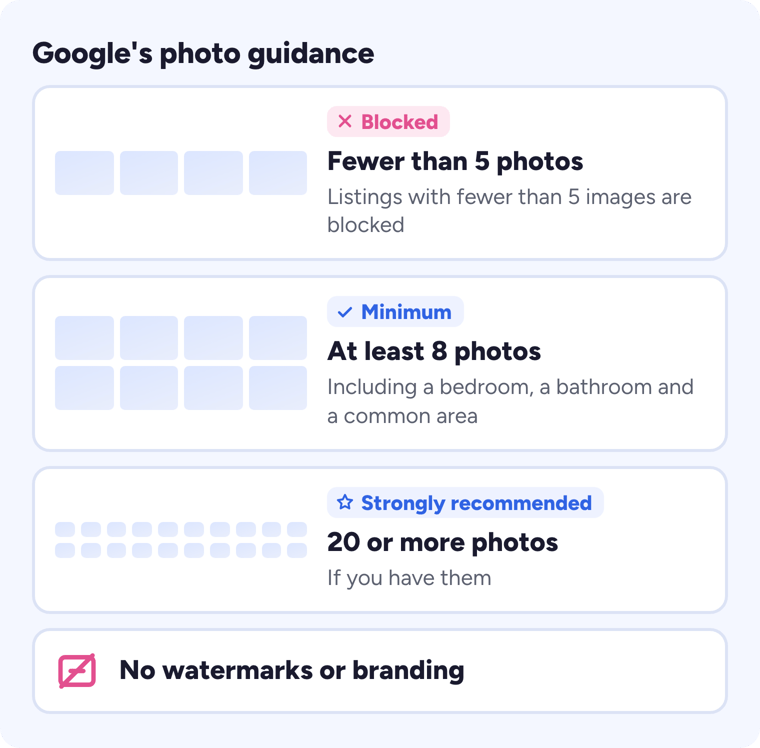
Google recommends "at least 8 photos (at least 1 bedroom, 1 bathroom, and 1 common area)", and strongly recommends 20 or more if you have them [12]. Listings with fewer than 5 images are blocked, and photos should have no watermark or branding [12].
3. Put Every Mandatory Fee in Your Rates
Google shows guests a total price, and that total has to include "all taxes and fees required to book a stay" [14]. Cleaning fees and mandatory taxes count; a refundable security deposit doesn't [15].
4. Launch Your Direct Booking Site
Your direct booking website is where guests from Google book, and Google asks for "a suitable direct booking website" on this route [7].
5. Switch On Google Vacation Rentals
In your Futurestay dashboard, switch Google Vacation Rentals on in your Channels settings. Futurestay generates and maintains the feed Google needs, and your availability, rates, photos and property details sync to Google automatically. It is included on both Futurestay plans.
6. Give It About 7 to 21 Days
Your properties start getting picked up by Google Vacation Rentals, usually in about 7 to 21 days. Google doesn't give an exact date; the next section explains why other guides quote longer waits.
How Long Does It Take to Show Up?
On Futurestay, properties start getting picked up by Google Vacation Rentals about 7 to 21 days after you switch it on. Google doesn't give an exact date.
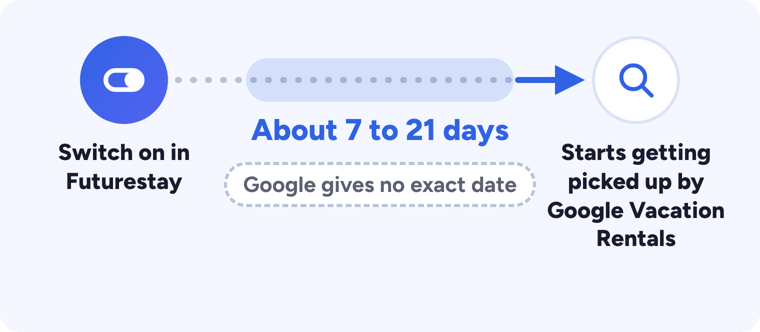
Other guides quote weeks or months because they are quoting Google's timelines for companies building their own integration. Google says "the integration process typically takes between 8 and 12 weeks after we receive your property list, but some partners have taken as little as 4 weeks" [7], and that ingesting a new partner's listing feed "can take approximately 2 to 4 weeks" [12]. As one of Google's vacation rentals partners, Futurestay has already done that part.
After that, Google "fetches the latest set of property listings in your inventory daily" [12], and Futurestay syncs your changes automatically.
What Your Booking Page Needs
Google sets rules for the page a guest lands on. These details must be visible or selectable "without any action from the user besides scrolling" [6]:
- Property name
- Occupancy
- Description
- Photos
- Reviews (if available)
- Booking links
- Other attributes when available
Google also asks for:
- The guest's dates and price, carried through. "Dates passed from Google are pre-selected in the list view and reflective of the price shown to the user" [6].
- A clear message when dates aren't available. If there are no booking links because the dates aren't available, "there must be a clear message saying so" [6].
- A page for every property. Each listing needs its own direct link, "unique to the listing" [16]; "Failure to provide a direct link will cause your listing to be deactivated" [6].
- A fast, working page. Google recommends a load time of "less than 3 seconds", and treats a page as non-functional "if a user is unable to interact with it for more than 10 seconds" [17].
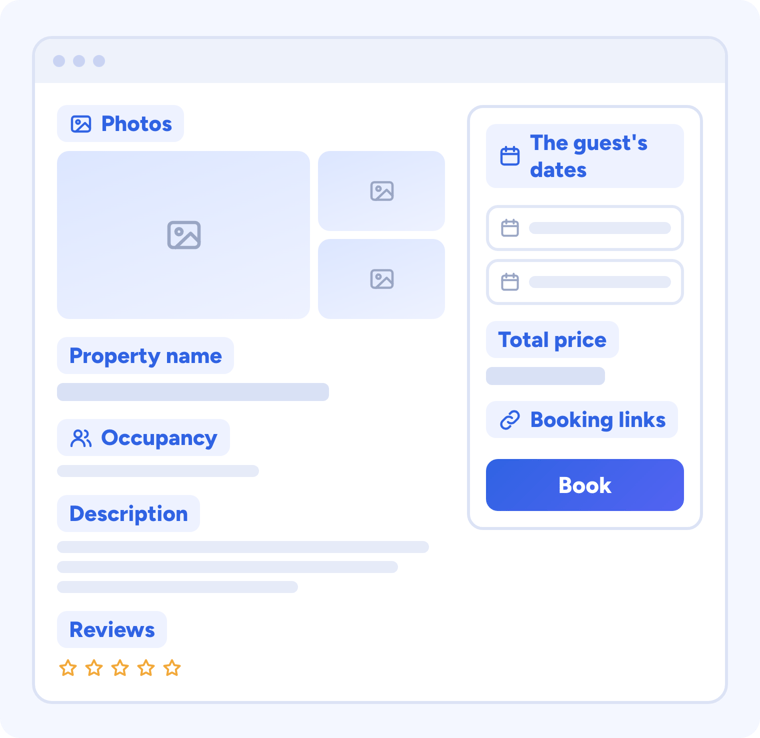
A direct booking website built for vacation rentals covers most of this list from the start.
What Google Looks For in Your Listing
- Photos. One of Google's help pages states 8 photos as a minimum rather than a recommendation [18], so treat the 8 in step 2 as the floor. Google chooses the photo order itself [12].
- Details. Google requires basics such as the property's name, address and capacity; without them, a listing is disabled automatically [12]. Then add every amenity you have, because guests filter by them [12]. Google may also read amenities from your photos, such as a kitchen [19].
- Stay length. "Vacation Rentals currently supports an advance booking window of up to 330 days and a length of stay of up to 30 days" [20].
- Reviews. Google accepts only reviews "directly submitted to the partner providing the reviews to Google"; reviews from "third-party or syndicated review sites aren't accepted", and they must be "genuine, independent, and unpaid" [21].
Keep Your Prices Accurate
Google checks prices closely, and the checks continue after a partner goes live [12]. When a guest clicks through, "the total price on the booking page must be prominently displayed, be the same as the total price displayed on Google's site", and "Users must be able to complete the booking at that price" [22]. The price has to include "all taxes and fees required to book a stay", and in the United States Google shows guests "the total price, which includes the base rate and mandatory non-governmental fees" [14].
It matters for visibility. "Higher price accuracy can result in better placement of your ads and free booking links" [23], and Google turns free booking links off when price accuracy falls below its threshold [22]. Only listings with accurate prices and availability can appear alongside hotels in unified lodging [3].
A quick checklist:
- Put every mandatory fee, such as cleaning, in your Futurestay rates.
- Don't collect a mandatory fee on arrival that isn't in your rates. Google counts mandatory on-site fees as part of the price [15].
- Keep your calendar current everywhere you list, with vacation rental calendar sync.
How Does Google Rank Vacation Rentals?
Google keeps it short: "All listings are ranked according to their usefulness" [3]. It encourages partners to keep "healthy feeds, with full itinerary coverage, high price accuracy, and rich content (images, descriptions, and attributes)" [3], and says higher price accuracy can mean better placement [23].
For a host, that comes down to the things this guide already covers: prices and availability for as many dates as you can offer, prices that match, plenty of good photos, and complete descriptions and amenities. Google's vacation rentals documentation doesn't name reviews, website SEO or backlinks as ranking factors.
How to Track Bookings From Google
Google explains how clicks from vacation rentals are tagged. For listings it reads from structured data, Google says it adds utm_source=google and utm_medium=vacation_rentals to the link automatically; for listings sent in a feed, it asks the partner to add its own tracking to each link [16].
Bookings from Google arrive in your Futurestay dashboard like any other direct booking, and Futurestay's Amplify plan includes Google Analytics tracking for your site.
Why Isn't My Listing Showing on Google?
Start with the timing, then check Google's own rules:
| Cause | What Google says | What to do |
|---|---|---|
| It has been less than about 21 days | Properties start getting picked up in about 7 to 21 days; Google gives no exact date | Give it a little longer |
| Fewer than 5 photos | "Listings with fewer than 5 images will be blocked" [12] | Add at least 8, including a bedroom, a bathroom and a common area |
| Missing details or amenities | Missing recommended details can hide a listing when guests filter [12] | Complete the description, capacity and amenities |
| No price or availability for the dates searched | Booking links appear when Google has a price for the guest's dates [6] | Open those dates and set rates |
| The stay is too long or too far ahead | Stays of up to 30 days, booked up to 330 days ahead [20] | Nothing to fix; this is Google's limit |
| Prices don't match | The total must match your booking page and include every mandatory fee [22] [14] | Put every mandatory fee in your rates |
| A private room or part of a home | "We only support full properties" [12] | Only entire homes can appear |
If a property still isn't showing after about 21 days, contact Futurestay's support team.
Is Google Vacation Rentals Worth It?
For a host with a direct booking site, it is worth switching on. Google charges nothing, guests book on your own site, and your rental reaches people searching on Google. It also sits alongside Airbnb and Vrbo rather than replacing them: keep the guests who start there, and add the travelers who search Google first.
Google publishes no figures on how many bookings a host can expect, so this guide doesn't give one. Results depend on your market, prices, photos and availability. Google Vacation Rentals works best as one channel among several. To attract direct bookings from more places, see our guide on how to get more direct bookings.
Where Futurestay Fits
Futurestay is one of Google's vacation rentals partners, on Google's own partner list [24], and Google Vacation Rentals is included on both Futurestay plans.
You switch it on in your dashboard, and Futurestay generates and maintains the feed Google needs. Your availability, rates, photos and property details sync to Google automatically, and your properties start getting picked up in about 7 to 21 days. Guests who find you on Google book on your own Futurestay direct booking site. Futurestay takes no commission on any booking; card processing goes to Stripe.
Keep Airbnb for the guests who start there. Bookings from Airbnb, Google and your own site land in one Futurestay dashboard, and you can sync Airbnb and Vrbo calendars with your own. Futurestay's Amplify plan adds a personal review of your Google-connected booking site, to help it turn more visitors into bookings.
See Futurestay's Google Vacation Rentals integration and pricing, or compare vacation rental software.
14-day free trial. Add your card, press Launch, and the first 14 days are free.
Frequently Asked Questions
Does Google Vacation Rentals charge a fee?
No. Google charges no fees for referrals or bookings from Google Vacation Rentals. Your costs are the software that connects you to Google and, if you take card payments, your card processor's fee.
How do I list my vacation rental on Google?
You connect through software on Google's list of vacation rentals partners, such as Futurestay, and switch Google Vacation Rentals on. Your properties then start getting picked up in about 7 to 21 days. Google doesn't give an exact date.
How long does it take to show up on Google Vacation Rentals?
On Futurestay, properties start getting picked up about 7 to 21 days after you switch it on, and Google doesn't give an exact date. The 8 to 12 weeks some guides quote is Google's timeline for companies building their own integration.
Is there a Google Vacation Rentals login or app for hosts?
You manage it through your software. On Futurestay, you switch Google Vacation Rentals on or off in your dashboard's Channels settings. The Hotel Center account other guides mention is for companies that work with Google directly, such as its software partners.
What is Google's version of Airbnb?
Google Vacation Rentals is the closest thing, but it isn't a booking site. It shows rentals from its partners in Google Search, Maps and Google Travel, and sends guests to book on the partner's site, which for Futurestay hosts is their own website.
Can I add vacation rental schema to my website to get on Google Vacation Rentals?
No. Google says its vacation rental structured data instructions are intended for sites that already work with a Google Technical Account Manager and have access to Hotel Center. For a host, connecting through a partner is the way in.
Should I create a Google Business Profile for my vacation rental?
No. Google's rules list rental properties such as vacation homes as ineligible for a Business Profile. A staffed sales or leasing office that meets customers in person can be eligible.
Can I pay to rank higher on Google Vacation Rentals?
Google ranks vacation rental listings by usefulness, and says higher price accuracy can improve placement. Its paid option, Travel Feeds in Search Ads, runs through a Hotel Center account. You can still run ordinary Google Search ads to your own site.
Where can I advertise my vacation rental for free?
Google Vacation Rentals is free from Google for eligible properties, through approved software such as Futurestay. Your own site and its local pages, social media, and local listings such as visitor bureau guides and chamber of commerce directories are other options; some local listings are free and some charge.
Sources
- Google, About vacation rentals on Google: https://support.google.com/hotelprices/answer/10062327
- Google, Find and book vacation rentals on Google (2019): https://blog.google/products-and-platforms/products/travel/find-and-book-vacation-rentals-on-google/
- Google, Unified lodging: https://support.google.com/hotelprices/answer/10960484
- Google Business Profile, business eligibility and ownership guidelines: https://support.google.com/business/answer/13763036
- Google Search Central, vacation rental structured data: https://developers.google.com/search/docs/appearance/structured-data/vacation-rental
- Google, Vacation rental referral experience policy: https://support.google.com/hotelprices/answer/10843498
- Google, Vacation rentals property managers starter guide: https://support.google.com/hotelprices/answer/12564561
- Google Ads Help, About Travel Feeds in Search Ads: https://support.google.com/google-ads/answer/15265488
- Google, Vacation rentals partners: Google Ads account setup: https://support.google.com/hotelprices/answer/16459141
- Google Ads Help: https://support.google.com/google-ads/answer/2567043
- Google, Categories for lodging businesses: https://support.google.com/hotelprices/answer/9970971
- Google for Developers, Vacation Rentals onboarding guide: https://developers.google.com/hotels/vacation-rentals/dev-guide/onboarding
- Google, Vacation rentals starter guide: https://support.google.com/hotelprices/answer/12568039
- Google, Taxes and Fees Policy: https://support.google.com/hotelprices/answer/6064432
- Google, Vacation rentals partners: price accuracy and data evaluation: https://support.google.com/hotelprices/answer/11947467
- Google, Vacation rentals direct links: https://support.google.com/hotelprices/answer/10519514
- Google, Vacation rentals partners: landing pages: https://support.google.com/hotelprices/answer/11949908
- Google, Photo recommendations and best practices: https://support.google.com/hotelprices/answer/13483115
- Google for Developers, vacation rental attributes: https://developers.google.com/hotels/vacation-rentals/dev-guide/vr-attributes
- Google, Vacation rentals partners: prices and booking window: https://support.google.com/hotelprices/answer/11947223
- Google, Third-party review policies: https://support.google.com/hotelprices/answer/13166783
- Google, Price Accuracy Policy: https://support.google.com/hotelprices/answer/6064419
- Google, Hotel Center policies: https://support.google.com/hotelprices/answer/11390302
- Google, Google's vacation rentals partners: https://support.google.com/hotelprices/answer/11946834
All sources checked on September 29, 2026.